
Want to score an easy win? Today, we're diving into a quick but unique vulnerability: Google Maps API key exposure. It's a straightforward find with potentially significant impacts, so let's break it down in under two minutes!
Ever stumbled upon an API key while analyzing through source code and thought, "Hmm, should I be concerned about this?" If you've seen URLs like maps.googleapi with google map api key exposure and ignore it, it's time to rethink. Today, I'm sharing how I cracked this common vulnerability and how you can leverage this knowledge to find potential issues and earn some serious bounties.

What Is a Google Maps API Key?
A Google Maps API key is like a pass for accessing Google Maps services. Developers use it to embed maps, fetch directions, and retrieve location details. But if this key ends up in the wrong hands, it can lead to unexpected expenses and, of course, an opportunity for us to find and fix vulnerabilities!
Why Should We Care?
Here's the kicker: An exposed API key isn't a flaw in Google's API — it's a configuration issue. But that doesn't mean it's harmless. If API key is exposed, unauthorized users might exploit it, leading to unexpected costs for the organization. Imagine an API key being used on unauthorized sites — organization's bill could skyrocket!
How to Spot the Vulnerability?
Here's a quick method to test if an API key is exposed:
Use the following URL to test the key:
https://maps.googleapis.com/maps/api/staticmap?center=28.61410704445088,%2077.20883462877246&zoom=12&size=2500x2000&maptype=roadmap&key=YOUR_API_KEY
Replace YOUR_API_KEY with the key you're testing.
Analyze the Response:
If you see a map: The API key is accessible and potentially exposed.
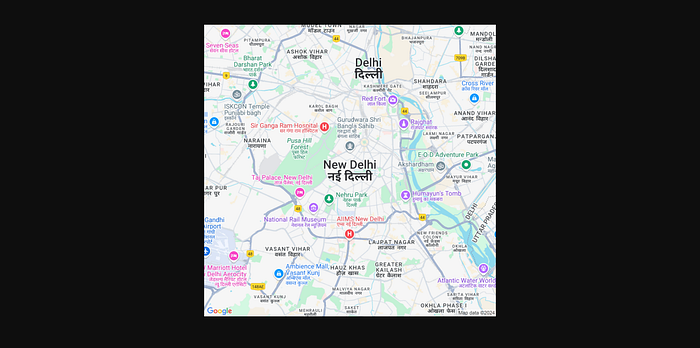
If you see an error: The key might be restricted or not valid.

Impact of Unauthorized API Key Usage
Unauthorized use can rack up significant costs because Google Maps APIs are billed per request. If the key is misused, the organization could face an unexpected financial burden. As bug hunters, finding this vulnerability can help prevent these potential issues and showcase your value.
How to Mitigate the Risk
Here's how organizations can protect their API keys:
Set API Key Restrictions: Use the Google Cloud Console to restrict which websites or apps can use the API key. Finding and reporting an exposed Google Maps API key is a valuable find that can prevent financial repercussions for organizations. Keep an eye out for these keys in your bug hunting journey!
Note: Due to Google's updated Google Maps policy, most programs do not accept it as a bug. However, if you're lucky, only a few programs might still accept it, but not all.
Happy hunting and stay sharp! 🕵️♂️💻