
Flash like Browsers enforces a same-origin policy to prevent external pages from requesting restricted resources. However, like browsers developers needed a way to relax this policy if required. To allow for this Adobe introduced Cross-domain Policy Files aka crossdomain.xml which is essentially the flash equivalent of CORS.
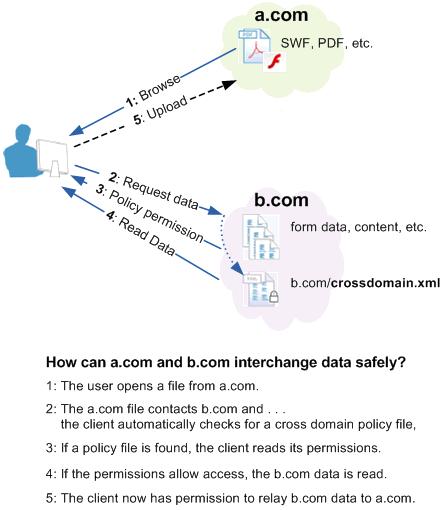
What Does a Cross-domain Policy File Look Like?
A Cross-domain policy file, often sits in the web root and can be accessed by going to target.com/crossdomain.xml (although it doesn't have to!). An example of insecure policy file looks like the below.
<?xml version="1.0"?>
<!DOCTYPE cross-domain-policy SYSTEM
"http://www.adobe.com/xml/dtds/cross-domain-policy.dtd">
<cross-domain-policy>
   <site-control permitted-cross-domain-policies="all"/>
   <allow-access-from domain="*" secure="false"/>
   <allow-http-request-headers-from domain="*" headers="*" secure="false"/>
</cross-domain-policy>
Breaking this down…
site-control: This defines which cross domain policies are valid, the main values are as below.
- none: No policy files are allowed anywhere on the target server, including this master policy file.
- master-only: Only this master policy file is allowed.
- by-content-type: [HTTP/HTTPS only] Only policy files served with Content-Type: text/x-cross-domain-policy are allowed.
- by-ftp-filename: [FTP only] Only policy files whose file names are crossdomain.xml (i.e. URLs ending in /crossdomain.xml) are allowed.
- all: All policy files on this target domain are allowed.
allow-access-from: This defines which domains, ports and HTTPS/Sockets are granted access. There are three attributes domain , to-ports and secure which are described below.
- domain: Specifies which domains/IP addresses are given access. A
*can be used as a wildcard to allow all domains or subdomains. If access from resources without a domain, i.e local files, a wildcard value by itself must be used. - to-ports: Used in socket requests only, a comma separated list of allowed ports.
- secure: Used to specify if access is only granted only to documents accessed over HTTPS on a domain meeting the
domainvalue (true) or to all documents meeting thedomainvalue (false).
allow-http-request-headers-from: This allows a request from an allowed domain to include user defined (NOTE: not standard headers like, cookies, they are included by default) headers. Like the above it has three attributes domain , headers and secure which are described below.
- domain: as above.
- headers: A comma separated list of allowed headers. A
*value can be used as a wildcard, either to allow all headers or as a suffix. - secure: as above.
The Exploit
To demonstrate just how damaging a permissive crossdomain.xml can be, I've downloaded the vulnerable bWAPP app. I'll leave out installing/configuring but if you need any help tweet me.
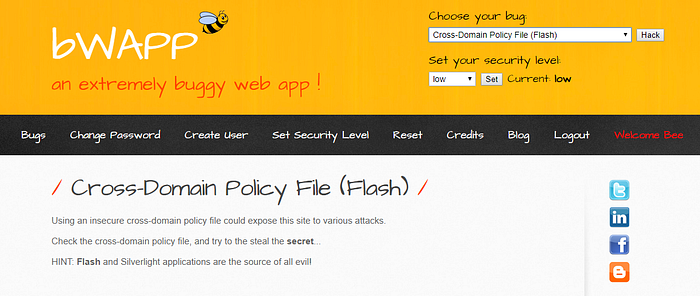
So the challenge can be summed up as
Manipulate a logged in user into accessing a malicious URL under your control (on a separate domain) and use that to steal the contents of http://192.168.0.31/bWAPP/secret.phpWe will also tack on our own challenge to create a new user using a malicious POST request.
On visiting the http://192.168.0.31/crossdomain.xml we can see the contents allow for any domain to access pages.
<cross-domain-policy>
   <allow-access-from domain="*"/>
</cross-domain-policy>
So we need to build up a way to request the /bwapp/secret.php page and receive the contents. There's already several sample files (see /evil/xdx.php, /evil/xdx.as, /evil/xdx.swd) but let's roll our own.
Now we just need a way to compile the above ActionScript (AS), my tool of choice for this is Apache Flex. After installing the tool we can use the below command to compile our ActionScript into a swf file (crossDomain.swf).
F:\Tools\flex\bin>amxmlc crossDomain.asNow all we need to do is move crossDomain.swf, a HTML file (the file we will trick the user into visiting and running flash on) and a listener.php file to a web root (Kali's Apache is fine).
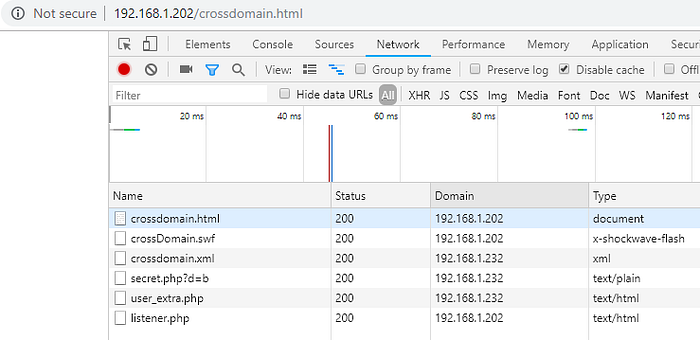
Then we trick an authenticated user into visiting the link using a Flash enabled browser. Resulting in the below set of requests.
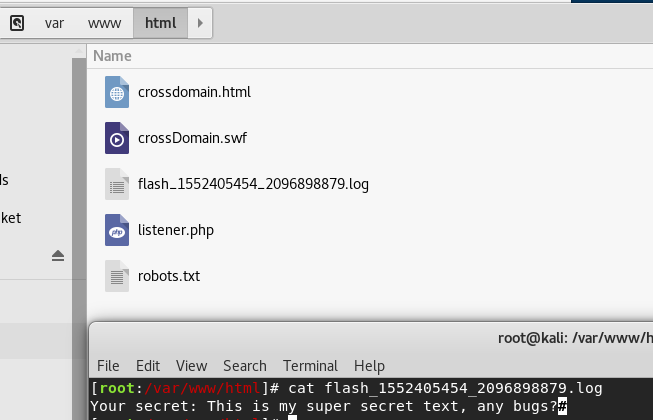
End Result
The above demonstrates both a GET and POST request, with these we can bypass CSRF controls (use a GET request to collect the CSRF token, then pass it to a POST request) and interact with the application in the context of the user we've manipulated into running our malicious Flash files.