

Imagine you build a React app and it stores the access token in localStorage. A simple XSS exploit—a malicious script injected through a compromised third-party library or an unvalidated user input—reads the token and sends it to an attacker's server.
Game over.
The attacker now has full access to your user's account until the token expires.
This is the problem with treating Single Page Applications (SPAs) as OAuth2 "public clients." Browsers are hostile environments.
Tokens stored in localStorage or sessionStorage are readable by any JavaScript running on the page. Even httpOnly cookies aren't enough when the SPA itself calls the token endpoint—the authorization code and client credentials are still exposed in browser memory.
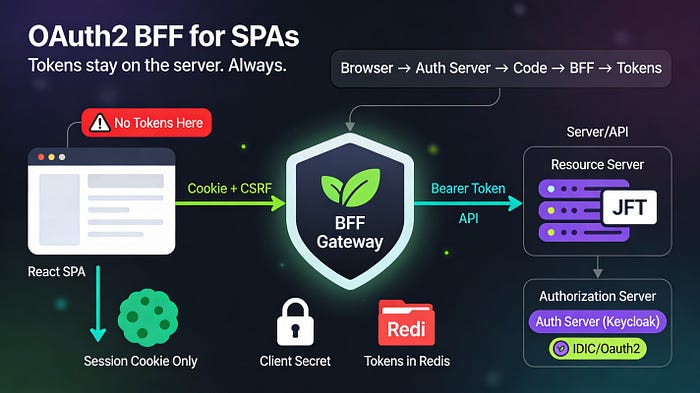
The Backend for Frontend (BFF) pattern solves this by moving OAuth2 entirely server-side.
If you need more details of the BFF pattern check this blog
Your SPA never sees tokens. Instead, it maintains a session with a backend gateway using httpOnly cookies. The gateway handles token negotiation, stores tokens server-side, and injects them into API requests before forwarding to resource servers. One compromised npm package can't steal what the browser never receives.
This blog walks through building an OAuth2 BFF with Spring Boot 3, Spring Cloud Gateway, and React — covering authorization code flow, session management, token relay, CSRF protection, and the trade-offs of adding infrastructure complexity.
The Problem: Browsers Are Not a Safe Place for Secrets
SPAs running OAuth2 as public clients have three fundamental security weaknesses.
1. Token Storage Is Always Vulnerable
localStorage/sessionStorage: Readable by any script on the page. One XSS exploit — malicious ad network, compromised CDN, infected npm package — and all tokens are gone.
In-memory storage: Wiped on page refresh. Users must re-authenticate constantly, which pushes teams back to localStorage.
httpOnly cookies: The best browser option, but still requires the SPA to call the token endpoint. The authorization code and PKCE verifier exist in browser memory during the OAuth2 handshake, creating a window for exploitation.
2. The Token Endpoint Must Be Public
If your SPA is the OAuth2 client, the token endpoint (/oauth/token) must accept requests from any origin. You can't firewall it to trusted IPs. You can't use client secrets (they'd be visible in the SPA bundle). Attackers can attempt brute-force attacks, replay attacks, or exploit misconfigurations.
3. You Can't Revoke JWTs
Access tokens are JWTs that are validated cryptographically by resource servers. Even if you terminate the user's session, the JWT remains valid until expiration. If an attacker steals a token with a 1-hour expiration, you have no way to invalidate it early. You can only wait.
The BFF Pattern: OAuth2 Stays on the Server
The Backend for Frontend introduces a trusted gateway between your SPA and backend APIs. It acts as a confidential OAuth2 client, handles all token negotiation, and maintains sessions with the frontend using secure cookies.
Architecture
┌──────────────┐          ┌──────────────┐          ┌──────────────┐
│   React SPA  │◄────────►│  BFF Gateway │◄────────►│  Resource    │
│              │  session │  (Spring     │  Bearer  │  Server      │
│   (Browser)  │  cookie  │   Cloud      │  token   │  (REST API)  │
│              │          │   Gateway)   │          │              │
└──────────────┘          └──────────────┘          └──────────────┘
                                 │
                                 │ Authorization
                                 │ Code Flow +PKCE
                                 ▼
                          ┌──────────────┐
                          │ Authorization│
                          │   Server     │
                          │  (Keycloak)  │
└──────────────┘Flow:
- User clicks "Login" → SPA redirects to BFF's OAuth2 login endpoint (
/oauth2/authorization/{provider}) - BFF initiates authorization code flow with PKCE (Proof Key for Code Exchange) with the authorization server (Keycloak, Auth0, Cognito)
- User authenticates at the authorization server, is redirected back to the BFF with an authorization code
- BFF exchanges code for tokens (confidentially, using client secret + PKCE verifier)
- BFF stores tokens in a Redis-backed session and returns a session cookie to the SPA
- SPA makes API calls to the BFF (
/api/orders), including the session cookie - BFF looks up tokens in the session, replaces the cookie with the access token, forwards the request to the resource server
- Resource server validates the JWT, processes the request, returns the response to the BFF
- BFF returns the response to the SPA
Key invariant: The SPA never receives an access token, refresh token, or authorization code. All OAuth2 state lives server-side
Spring Boot 4 note: PKCE (Proof Key for Code Exchange) is now enabled by default for confidential OAuth2 clients. This provides additional protection against authorization code interception attacks.
Benefits Over Public Client SPAs
Security
Token endpoint is protected. The authorization server can firewall the token endpoint to only accept requests from your backend's IP range. Attackers can't directly call it.
Client secret is used. The BFF is a confidential client. The token endpoint requires client_secret, which only the backend knows. Public clients have no secret—anyone can impersonate them.
PKCE is enforced. Spring Boot 4 enables PKCE by default, adding an additional layer of protection even for confidential clients. The code verifier never leaves the BFF.
Tokens never reach the browser. XSS can't steal what isn't there. An attacker who compromises the SPA can steal the session cookie, but that's useless without the session data (stored in Redis).
Instant session revocation. When you log a user out, the BFF deletes the session from Redis. The access token still exists, but the SPA can no longer use it (no session = no token relay). This limits the blast radius of stolen tokens to the time between logout and token expiration.
CSRF protection is simpler. httpOnly, Secure, SameSite=Lax cookies prevent many attack vectors. The BFF can enforce CSRF tokens on state-changing requests.
Developer Experience
No token management in the SPA. Your React app doesn't need useAuth, refreshToken(), isTokenExpired() logic. It's just fetch('/api/orders') with credentials: 'include'. The BFF handles everything.
Refresh tokens stay invisible. The BFF automatically refreshes access tokens before they expire. The SPA never knows it happened.
Consistent session lifecycle. Centralized session storage means users have one session across all tabs/devices (if using Redis). Log out in one tab, logged out everywhere instantly.
Implementation: Spring Boot 4 + Spring Cloud Gateway
We'll build a BFF using Spring Cloud Gateway 5.0 (aligned with Spring Boot 4) as the OAuth2 client and proxy, with Redis for session storage.
Maven Dependencies
<parent>
        <groupId>org.springframework.boot</groupId>
        <artifactId>spring-boot-starter-parent</artifactId>
        <version>4.0.1</version>
        <relativePath/>
    </parent>
    <groupId>com.example</groupId>
    <artifactId>demo</artifactId>
    <version>0.0.1-SNAPSHOT</version>
    <name>medium</name>
    <description>Demo projects for Medium blog</description>

    <properties>
        <java.version>21</java.version>
        <spring-cloud.version>2025.1.1</spring-cloud.version>
    </properties>

    <dependencies>
        <!-- Spring Cloud Gateway (includes Reactor Netty) -->
        <dependency>
            <groupId>org.springframework.cloud</groupId>
            <artifactId>spring-cloud-gateway-server-webflux</artifactId>
        </dependency>

        <!-- OAuth2 Client -->
        <dependency>
            <groupId>org.springframework.boot</groupId>
            <artifactId>spring-boot-starter-oauth2-client</artifactId>
        </dependency>

        <!-- Session with Redis -->
        <dependency>
            <groupId>org.springframework.session</groupId>
            <artifactId>spring-session-data-redis</artifactId>
        </dependency>
        <dependency>
            <groupId>org.springframework.boot</groupId>
            <artifactId>spring-boot-starter-data-redis-reactive</artifactId>
        </dependency>

        <!-- Security -->
        <dependency>
            <groupId>org.springframework.boot</groupId>
            <artifactId>spring-boot-starter-security</artifactId>
        </dependency>
    </dependencies>

    <dependencyManagement>
        <dependencies>
            <dependency>
                <groupId>org.springframework.cloud</groupId>
                <artifactId>spring-cloud-dependencies</artifactId>
                <version>${spring-cloud.version}</version>
                <type>pom</type>
                <scope>import</scope>
            </dependency>
        </dependencies>
    </dependencyManagement>
What changed from Spring Boot 3: The Spring Cloud release train is now 2025.1.1 (Oakwood) for Spring Boot 4.0 compatibility. The OAuth2 Client configuration remains unchanged — Spring Security 7.0 is fully backward-compatible with OAuth2 Client usage patterns from Spring Security 6.
Configuration: OAuth2 Client Registration
Configure the BFF as an OAuth2 client. This example uses Keycloak, but Auth0, Cognito, or any OIDC provider works the same.
# application.yml
spring:
  application:
    name: bff-gateway

  # Redis for session storage
  data:
    redis:
      host: localhost
      port: 6379

  session:
    store-type: redis
    timeout: 1800s  # 30 minutes

  # OAuth2 client registration
  security:
    oauth2:
      client:
        provider:
          keycloak:
            issuer-uri: https://keycloak.example.com/realms/my-realm
            user-name-attribute: preferred_username

        registration:
          keycloak:
            provider: keycloak
            client-id: bff-gateway
            client-secret: your-client-secret-here
            authorization-grant-type: authorization_code
            redirect-uri: "{baseUrl}/login/oauth2/code/{registrationId}"
            scope:
              - openid
              - profile
              - email
              - offline_access  # for refresh tokens

  # Cloud Gateway routes
  cloud:
    gateway:
      default-filters:
        - SaveSession           # persist session with tokens
        - DedupeResponseHeader=Access-Control-Allow-Origin

      routes:
        # Route 1: Proxy to Resource Server (API)
        - id: api-resource-server
          uri: http://localhost:8081
          predicates:
            - Path=/api/**
          filters:
            - TokenRelay=          # inject access token from session
            - StripPrefix=1         # /api/orders → /orders

        # Route 2: Serve React SPA
        - id: spa-ui
          uri: http://localhost:3000
          predicates:
            - Path=/ui/**

# Server config
server:
  port: 8080

# Logging
logging:
  level:
    org.springframework.cloud.gateway: DEBUG
    org.springframework.security: DEBUG
Key pieces:
SaveSession: Default filter that persists the session (with tokens) after each request.TokenRelay=: Extracts the access token from the session and adds it as aBearerheader before forwarding to the resource server.redirect-uri: The authorization server redirects back here after user login.scope: offline_access: Requests a refresh token (required for automatic token refresh).- PKCE: Enabled by default in Spring Boot 4 — no explicit configuration needed.
Security Configuration
Configure two security filter chains: one for OAuth2 login (session-based), one for public endpoints.
package com.example.bff;

import org.springframework.context.annotation.Bean;
import org.springframework.context.annotation.Configuration;
import org.springframework.core.annotation.Order;
import org.springframework.security.config.Customizer;
import org.springframework.security.config.annotation.web.reactive.EnableWebFluxSecurity;
import org.springframework.security.config.web.server.ServerHttpSecurity;
import org.springframework.security.web.server.SecurityWebFilterChain;
import org.springframework.security.web.server.authentication.logout.RedirectServerLogoutSuccessHandler;
import org.springframework.security.web.server.csrf.CookieServerCsrfTokenRepository;
import org.springframework.security.web.server.util.matcher.OrServerWebExchangeMatcher;
import org.springframework.security.web.server.util.matcher.PathPatternParserServerWebExchangeMatcher;

import java.net.URI;

@Configuration
@EnableWebFluxSecurity
public class SecurityConfig {

    @Bean
    @Order(1)
    public SecurityWebFilterChain oauth2SecurityFilterChain(ServerHttpSecurity http) {

        RedirectServerLogoutSuccessHandler logoutSuccessHandler =
                new RedirectServerLogoutSuccessHandler();
        logoutSuccessHandler.setLogoutSuccessUrl(URI.create("/ui/"));

        http
                .securityMatcher(new OrServerWebExchangeMatcher(
                        new PathPatternParserServerWebExchangeMatcher("/api/**"),
                        new PathPatternParserServerWebExchangeMatcher("/login/**"),
                        new PathPatternParserServerWebExchangeMatcher("/oauth2/**"),
                        new PathPatternParserServerWebExchangeMatcher("/logout")
                ))
                .authorizeExchange(authorize -> authorize
                        .pathMatchers("/api/**").authenticated()
                        .pathMatchers("/login/**").permitAll()
                        .pathMatchers("/oauth2/**").permitAll()
                        .anyExchange().authenticated()
                )
                .oauth2Login(Customizer.withDefaults())
                .logout(logout -> logout
                        .logoutUrl("/logout")
                        .logoutSuccessHandler(logoutSuccessHandler)
                )
                .csrf(csrf -> csrf
                        .csrfTokenRepository(CookieServerCsrfTokenRepository.withHttpOnlyFalse())
                );

        return http.build();
    }

    @Bean
    @Order(2)
    public SecurityWebFilterChain publicSecurityFilterChain(ServerHttpSecurity http) {
        http
                .securityMatcher(new OrServerWebExchangeMatcher(
                        new PathPatternParserServerWebExchangeMatcher("/ui/**"),
                        new PathPatternParserServerWebExchangeMatcher("/actuator/health")
                ))
                .authorizeExchange(authorize -> authorize
                        .anyExchange().permitAll()
                )
                .csrf(ServerHttpSecurity.CsrfSpec::disable);

        return http.build();
    }
}Flow:
- Request to
/api/*→ matched byoauth2SecurityFilterChain→ requires authentication → if no session, redirects to OAuth2 provider - After login, session created with tokens
- Subsequent requests to
/api/*→ session valid →TokenRelayinjects token → forwarded to resource server - Request to
/ui/*→ matched bypublicSecurityFilterChain→ public access (SPA assets)
Spring Boot 4 note: The
ServerHttpSecurityAPI remains unchanged from Spring Boot 3. Spring Security 7.0 is fully backward-compatible for OAuth2 Client configurations.
CSRF Protection for the SPA
Because the BFF uses session cookies, we need CSRF protection. The CookieServerCsrfTokenRepository.withHttpOnlyFalse() stores the CSRF token in a cookie readable by JavaScript (not httpOnly) so the SPA can include it in request headers.
React: Reading and Sending the CSRF Token
// utils/csrf.js
export function getCsrfToken() {
  const name = 'XSRF-TOKEN=';
  const cookies = document.cookie.split(';');
  for (let cookie of cookies) {
    cookie = cookie.trim();
    if (cookie.startsWith(name)) {
      return cookie.substring(name.length);
    }
  }
  return null;
}

// api/client.js
import { getCsrfToken } from '../utils/csrf';

export async function apiRequest(url, options = {}) {
  const csrfToken = getCsrfToken();

  const headers = {
    'Content-Type': 'application/json',
    ...(csrfToken && { 'X-XSRF-TOKEN': csrfToken }),
    ...options.headers,
  };

  const response = await fetch(url, {
    ...options,
    headers,
    credentials: 'include',  // include session cookie
  });

  if (!response.ok) {
    throw new Error(`API error: ${response.statusText}`);
  }

  return response.json();
}

// Example usage in a component
import { apiRequest } from './api/client';

function OrderList() {
  const [orders, setOrders] = useState([]);

  useEffect(() => {
    apiRequest('/api/orders')
      .then(setOrders)
      .catch(console.error);
  }, []);

  const createOrder = async (order) => {
    await apiRequest('/api/orders', {
      method: 'POST',
      body: JSON.stringify(order),
    });
  };

  return (
    <div>
      {orders.map(order => <OrderCard key={order.id} order={order} />)}
      <button onClick={() => createOrder({ productId: 'abc', quantity: 1 })}>
        Create Order
      </button>
    </div>
  );
}Pattern: credentials: 'include' sends the session cookie. The CSRF token is read from the XSRF-TOKEN cookie and sent as the X-XSRF-TOKEN header. Spring Security validates it.
Login Flow: Redirecting to OAuth2 Provider
The SPA doesn't call the token endpoint. It redirects the entire browser to the BFF's OAuth2 authorization endpoint.
// components/Login.jsx
function Login() {
  const handleLogin = () => {
    // Redirect browser to BFF's OAuth2 authorization endpoint
    window.location.href = '/oauth2/authorization/keycloak';
  };

  return (
    <div className="login-page">
      <h1>Welcome</h1>
      <button onClick={handleLogin}>Log in with Keycloak</button>
    </div>
  );
}
What happens:
- Browser navigates to
/oauth2/authorization/keycloak - Spring Security's OAuth2 client redirects to Keycloak's login page
- User authenticates at Keycloak
- Keycloak redirects back to the BFF with an authorization code
- BFF exchanges code for tokens (using client secret + PKCE verifier)
- BFF stores tokens in Redis session
- BFF sets session cookie in browser
- BFF redirects to
/ui/(post-login success URL) - SPA is now authenticated — future API calls include the session cookie
Why not XHR? The authorization code flow requires multiple redirects between the browser, the BFF, and the authorization server. The browser must participate directly. You can't do this with fetch().
Logout: Destroying the Session
// components/Header.jsx
function Header() {
  const handleLogout = async () => {
    await fetch('/logout', {
      method: 'POST',
      credentials: 'include',
      headers: { 'X-XSRF-TOKEN': getCsrfToken() },
    });

    // Redirect to login page
    window.location.href = '/ui/';
  };

  return (
    <header>
      <nav>
        <button onClick={handleLogout}>Log out</button>
      </nav>
    </header>
  );
}
The BFF deletes the session from Redis. The session cookie is invalidated. The access token still exists (JWTs can't be revoked), but the SPA can't use it because the token relay filter has no session to read from.
Providing Login Options (Multi-Provider Support)
If you support multiple OAuth2 providers (Google, GitHub, Keycloak), expose a login options endpoint.
Backend: Login Options Controller
package com.example.bff.controller;

import org.springframework.security.oauth2.client.registration.ClientRegistration;
import org.springframework.security.oauth2.client.registration.ReactiveClientRegistrationRepository;
import org.springframework.web.bind.annotation.GetMapping;
import org.springframework.web.bind.annotation.RestController;
import reactor.core.publisher.Flux;
import reactor.core.publisher.Mono;

import java.util.List;
import java.util.stream.Collectors;

@RestController
public class LoginOptionsController {

    private final ReactiveClientRegistrationRepository clientRegistrationRepository;

    public LoginOptionsController(ReactiveClientRegistrationRepository clientRegistrationRepository) {
        this.clientRegistrationRepository = clientRegistrationRepository;
    }

    @GetMapping("/login-options")
    public Mono<List<LoginOption>> getLoginOptions() {
        return clientRegistrationRepository.findAll()
            .filter(registration -> "authorization_code".equals(
                registration.getAuthorizationGrantType().getValue())
            )
            .map(registration -> new LoginOption(
                registration.getClientName(),
                "/oauth2/authorization/" + registration.getRegistrationId()
            ))
            .collectList();
    }

    public record LoginOption(String label, String loginUri) {}
}
Frontend: Login Selection
// components/Login.jsx
import { useEffect, useState } from 'react';

function Login() {
  const [providers, setProviders] = useState([]);

  useEffect(() => {
    fetch('/login-options')
      .then(res => res.json())
      .then(setProviders)
      .catch(console.error);
  }, []);

  return (
    <div className="login-page">
      <h1>Log in</h1>
      {providers.map(provider => (
        <button
          key={provider.loginUri}
          onClick={() => window.location.href = provider.loginUri}
        >
          {provider.label}
        </button>
      ))}
    </div>
  );
}
The Resource Server (Backend API)
The resource server doesn't change. It validates JWTs as usual. It doesn't know or care that tokens come from a BFF instead of a SPA.
package com.example.resource;

import org.springframework.context.annotation.Bean;
import org.springframework.context.annotation.Configuration;
import org.springframework.security.config.annotation.web.builders.HttpSecurity;
import org.springframework.security.web.SecurityFilterChain;

@Configuration
public class ResourceServerConfig {

    @Bean
    public SecurityFilterChain securityFilterChain(HttpSecurity http) throws Exception {
        http
            .authorizeHttpRequests(authorize -> authorize
                .requestMatchers("/actuator/health").permitAll()
                .anyRequest().authenticated()
            )
            .oauth2ResourceServer(oauth2 -> oauth2
                .jwt()  // validate JWT access tokens
            );

        return http.build();
    }
}
# Resource server application.yml
spring:
  security:
    oauth2:
      resourceserver:
        jwt:
          issuer-uri: https://keycloak.example.com/realms/my-realm
package com.example.resource.controller;

import org.springframework.security.core.annotation.AuthenticationPrincipal;
import org.springframework.security.oauth2.jwt.Jwt;
import org.springframework.web.bind.annotation.GetMapping;
import org.springframework.web.bind.annotation.RestController;

import java.util.List;

@RestController
public class OrderController {

    @GetMapping("/orders")
    public List<Order> getOrders(@AuthenticationPrincipal Jwt jwt) {
        String userId = jwt.getSubject();
        // Fetch user's orders from database
        return List.of(
            new Order("order-1", "Product A", 2),
            new Order("order-2", "Product B", 1)
        );
    }

    public record Order(String id, String product, int quantity) {}
}
The @AuthenticationPrincipal Jwt jwt parameter extracts the validated token. The resource server sees a valid JWT with a Bearer header, validates it against the issuer's public keys, and grants access.
Session Management with Redis
Spring Session automatically stores sessions in Redis when spring-session-data-redis is on the classpath. Each session contains:
- OAuth2 access token
- Refresh token
- User principal
- CSRF token
spring:
  session:
    store-type: redis
    timeout: 1800s  # 30 minutes idle timeout

  data:
    redis:
      host: localhost
port: 6379Benefits:
- Horizontal scaling: Multiple BFF instances share the same Redis cluster. Sessions are consistent across all instances.
- Instant revocation: Delete the session key in Redis → user is logged out immediately across all devices.
- Automatic cleanup: Redis TTL expires sessions after
timeoutseconds of inactivity.
Docker Compose for Local Development
version: '3.8'

services:
  redis:
    image: redis:7-alpine
    ports:
      - "6379:6379"

  keycloak:
    image: quay.io/keycloak/keycloak:24.0
    environment:
      KEYCLOAK_ADMIN: admin
      KEYCLOAK_ADMIN_PASSWORD: admin
    ports:
      - "8180:8080"
    command: start-dev

  bff-gateway:
    build: ./bff-gateway
    ports:
      - "8080:8080"
    environment:
      SPRING_DATA_REDIS_HOST: redis
      SPRING_SECURITY_OAUTH2_CLIENT_PROVIDER_KEYCLOAK_ISSUER_URI: http://keycloak:8080/realms/my-realm
    depends_on:
      - redis
      - keycloak

  resource-server:
    build: ./resource-server
    ports:
      - "8081:8081"
    environment:
      SPRING_SECURITY_OAUTH2_RESOURCESERVER_JWT_ISSUER_URI: http://keycloak:8080/realms/my-realm
    depends_on:
      - keycloak

  react-spa:
    build: ./react-spa
    ports:
      - "3000:80"
Token Refresh is Automatic
Spring Security's OAuth2 client automatically refreshes access tokens using the refresh token when the access token is close to expiration. You don't need to write any refresh logic.
How it works:
- Request arrives at
/api/orders TokenRelayfilter extracts access token from session- Spring checks if token is expired or expiring soon (within 1 minute of expiration)
- If expiring, Spring calls the token endpoint with
grant_type=refresh_token - Authorization server returns a new access token (and optionally a new refresh token)
- Spring updates the session with the new token
TokenRelayinjects the fresh token into the request- Request forwarded to resource server
The SPA never knows this happened. From its perspective, the session just works.
The Honest Part: BFF Adds Infrastructure Complexity
The BFF pattern improves security dramatically, but it's not free.
Costs
- Infrastructure overhead: You now run a gateway service, a session store (Redis), and manage the dependency between them. If Redis goes down, all sessions are lost (users logged out).
- Latency: Every API call goes through the gateway. That's an extra hop — typically 5–20ms. For latency-sensitive applications, this matters.
- Operational complexity: You're now responsible for the gateway's uptime, scaling, and monitoring. Public client SPAs are stateless — you just deploy the bundle to a CDN.
- Session stickiness: If you're not using Redis (e.g., in-memory sessions), you need sticky sessions at the load balancer. This complicates scaling and failover.
- OAuth2 expertise required: Debugging authorization code flow issues, token refresh failures, and session expiration edge cases requires deep OAuth2 knowledge. Public client SPAs are simpler (even if less secure).
When the BFF Isn't Worth It
- Low-security use cases: A personal blog, a demo app, or a side project with no sensitive data. The risk doesn't justify the infrastructure.
- Team lacks backend skills: If your team is purely frontend-focused and no one wants to operate a Java gateway + Redis cluster, the public client pattern might be pragmatic.
- Very low latency requirements: If every millisecond matters (trading platforms, gaming), the extra hop might break SLAs.
- Serverless constraints: If you're committed to a serverless architecture (Lambda + S3 + CloudFront), adding a stateful gateway contradicts the model.
When the BFF Is Essential
- Regulated industries: Finance, healthcare, government. Token security requirements are strict. Public clients often don't pass compliance.
- High-value applications: E-commerce checkouts, admin panels, financial dashboards. The cost of a token breach (account takeover, data exfiltration) far exceeds the cost of running a BFF.
- Enterprise SSO: If you're using corporate identity providers (Okta, Azure AD, Keycloak) and need instant session revocation, the BFF is the only practical option.
- Large teams: Once you have dedicated backend engineers, the infrastructure burden is manageable. The BFF becomes standard practice.