

It happened again this morning.
But something felt… off.
We like to think we're too smart to get phished. We think scams are just Nigerian Princes offering us gold bullion in broken English.
Those days are over.
If you're not on Medium Membership, you can read article for free HERE!
Modern spoofing is terrifyingly good. Attackers don't just copy the look; they can sometimes manipulate the very signals your email provider uses to trust a message.
If you run a business, manage a team or just have a bank account you care about, you need to understand what is actually happening under the hood of your inbox.
Here is the non-technical guide to verifying email authenticity (without needing a CS degree).
Phase 1: The Visual Deception 👀
Hackers rely on our laziness. We glance, we don't inspect.
The "Display Name" Trick Most mobile mail apps hide the actual email address and just show the name.
Sender: Apple Support Actual email: [email protected]
The "Reply-To" Trap This one is nastier. The email might actually come from a hacked account of someone you know. But hidden in the metadata is a "Reply-To" field. You hit reply to your boss, John, but the email quietly routes to Attacker_Dave.
The Fix: Always. Expand. The. Details. On mobile, tap the name. On desktop, hover over it. If the domain doesn't match the company perfectly (e.g.,paypal-support.com instead of paypal.com), delete it immediately.
Phase 2: The Invisible Bodyguards 🛡️
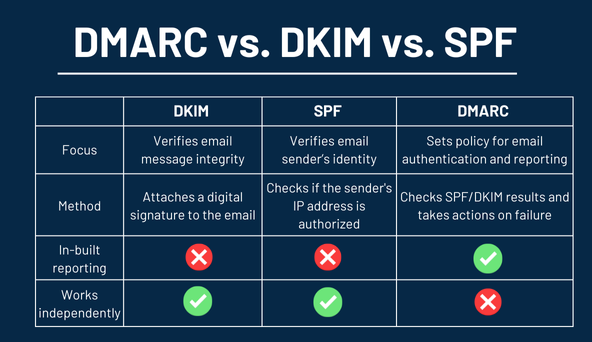
What folks usually miss is that there are three distinct technologies working silently to stop hackers.
When a spoofed email lands in your Spam folder (or doesn't arrive at all), it's usually because one of these three heroes caught it. You'll see these acronyms a lot, so let's explain them like we're at a nightclub.
1. SPF (Sender Policy Framework) Role: The Bouncer's Guest List
Imagine your email domain is a private club. You tell the bouncer (the receiving server): "Only IP addresses A, B, and C are allowed inside."
If a hacker tries to send an email appearing to be from you, but they are sending it from IP address X? The bouncer checks the list. "You're not on the list." Blocked.
2. DKIM (DomainKeys Identified Mail) Role: The Wax Seal
Back in the day, kings sent letters with a wax seal. If the seal was broken, you knew a messenger had tampered with it.
DKIM is the digital version. It adds an encrypted signature to the email header. If a hacker intercepts the email and changes the bank account number inside the message body? The "seal" breaks. The math doesn't add up anymore. Flagged.
3. DMARC Role: The Boss
SPF and DKIM are just checks. DMARC is the instruction manual for what to do when those checks fail.
Without DMARC, a server sees a fake email and says, "Hmm, this looks fake… but I'll deliver it anyway just in case." With DMARC, you (the domain owner) can scream: "If the Guest List (SPF) or Wax Seal (DKIM) fail, DESTROY THE MESSAGE."
🕵️♂️ How to gain "X-Ray Vision" on any Email
You don't just have to trust that these protocols are working. You can check them right now.
If you use Gmail:
- Open that suspicious email.
- Click the three dots (top right).
- Select "Show Original".
Google opens a dashboard. Look for SPF, DKIM, and DMARC.
You want to see a green PASS. If you see a red FAIL or SOFTFAIL on an email asking for money or passwords?
Do not click. Do not reply. Run.
Final Thoughts
Security isn't about being paranoid; it's about being observant.
The attacks are getting smarter (thanks, AI), but the fundamental protocols of the internet generally hold up: if we bother to look at them.
Stay safe out there. And maybe double-check that "Invoice Overdue" email one more time?
If you found this breakdown helpful, drop a like or share it. I write about making cybersecurity actually understandable for normal humans.
Who Am I ?
Hi, I'm Dhanush Nehru an Engineer, Cybersecurity Enthusiast, Youtuber and Content creator. I document my journey through articles and videos, sharing real-world insights about DevOps, automation, security, cloud engineering and more.
You can support me / sponsor me or follow my work via X, Instagram ,Github or Youtube