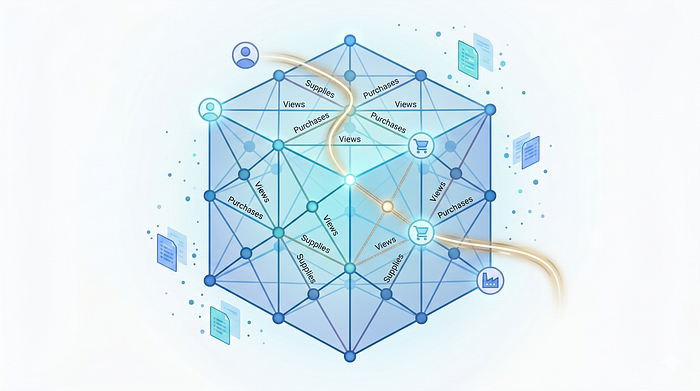


TL;DR: BigQuery has launched BigQuery Graph (Preview). When combined with the new BigQuery Conversational Analytics (Data Agents), graphs become the ultimate context engine for AI, allowing you to ask complex, multi-hop questions over your data without writing a single line of SQL.
When building agile data analytics platforms, one of the most persistent hurdles is providing AI with the right context. Large Language Models (LLMs) are incredibly capable, but they may struggle to infer the complex, multi-hop realities of production data.
Traditionally, solving this meant engineering massive, wide views or hoping the model could accurately build complex JOIN logic on the fly.
Enter a game-changing combination: BigQuery Graph and BigQuery Conversational Analytics (Data Agents).
Google Cloud's release of BigQuery Graph allows you to build native property graphs directly over your existing data. When combined with BigQuery Data Agents, graphs become the ultimate context engine for AI. By explicitly defining relationships as nodes and edges, every connection brings immediate, valuable context to the agent. You can ask complex, relationship-driven questions and get accurate answers without writing a single line of SQL.
Let's walk through a multi-hop scenario to demonstrate how to architect a complex graph and use it as a hyper-contextual source for your Data Agent.
The Scenario: Multi-Hop E-Commerce Topology
To demonstrate the power of graph context, we need a scenario where relationships matter. In a real-world ecosystem, users browse, buy, and interact with products supplied by different brands.
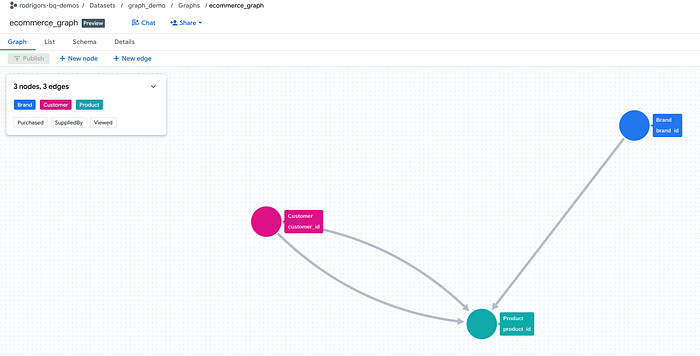
We will build a topology with three node types and three edge types:
- Nodes:
Customers,Products,Brands - Edges:
Views(Customer to Product),Purchases(Customer to Product),Supplies(Brand to Product)
Step 1: The Relational Foundation
BigQuery Graph requires strict uniqueness for nodes to map edges correctly. We will define our base tables using PRIMARY KEY constraints.
Run the following SQL to generate the schema and sample data:
-- 1. Create Node Tables
CREATE OR REPLACE TABLE `your_project.your_dataset.customers` (
    customer_id STRING,
    name STRING,
    segment STRING,
    PRIMARY KEY (customer_id) NOT ENFORCED
);

CREATE OR REPLACE TABLE `your_project.your_dataset.brands` (
    brand_id STRING,
    brand_name STRING,
    PRIMARY KEY (brand_id) NOT ENFORCED
);

CREATE OR REPLACE TABLE `your_project.your_dataset.products` (
    product_id STRING,
    product_name STRING,
    category STRING,
    price FLOAT64,
    PRIMARY KEY (product_id) NOT ENFORCED
);

-- Populate Nodes
INSERT INTO `your_project.your_dataset.customers` VALUES ('C1', 'Alex', 'Premium'), ('C2', 'Jordan', 'Standard'), ('C3', 'Casey', 'Premium');
INSERT INTO `your_project.your_dataset.brands` VALUES ('B1', 'DataTech'), ('B2', 'CloudGear');
INSERT INTO `your_project.your_dataset.products` VALUES
('P1', 'Cloud-Native Architecture Guide', 'Books', 45.00),
('P2', 'Mechanical Keyboard', 'Electronics', 150.00),
('P3', 'Ergonomic Mouse', 'Electronics', 80.00);

-- 2. Create Edge Tables (Relationships)
CREATE OR REPLACE TABLE `your_project.your_dataset.purchases` (
    purchase_id STRING,
    customer_id STRING,
    product_id STRING,
    purchase_date DATE,
    PRIMARY KEY (purchase_id) NOT ENFORCED
);

CREATE OR REPLACE TABLE `your_project.your_dataset.views` (
    view_id STRING,
    customer_id STRING,
    product_id STRING,
    view_date DATE,
    PRIMARY KEY (view_id) NOT ENFORCED
);

CREATE OR REPLACE TABLE `your_project.your_dataset.brand_supplies` (
    supply_id STRING,
    brand_id STRING,
    product_id STRING,
    PRIMARY KEY (supply_id) NOT ENFORCED
);

-- Populate Edges
INSERT INTO `your_project.your_dataset.brand_supplies` VALUES ('S1', 'B1', 'P1'), ('S2', 'B2', 'P2'), ('S3', 'B2', 'P3');
INSERT INTO `your_project.your_dataset.views` VALUES ('V1', 'C1', 'P2', '2023-10-01'), ('V2', 'C1', 'P3', '2023-10-02'), ('V3', 'C2', 'P1', '2023-10-03');
INSERT INTO `your_project.your_dataset.purchases` VALUES ('O1', 'C1', 'P1', '2023-10-05'), ('O2', 'C2', 'P3', '2023-10-10'), ('O3', 'C3', 'P2', '2023-10-12');
Note: Replace your_project.your_dataset with your actual BigQuery project and dataset IDs.
Step 2: Instantiating the BigQuery Graph
Now, we elevate this relational data into a multi-dimensional Graph. This explicit DDL statement is what gives our AI agent its "map of reality."
CREATE OR REPLACE PROPERTY GRAPH `your_project.your_dataset.ecommerce_graph`
  NODE TABLES (
    `your_project.your_dataset.customers` AS Customer,
    `your_project.your_dataset.products` AS Product,
    `your_project.your_dataset.brands` AS Brand
  )
  EDGE TABLES (
    `your_project.your_dataset.purchases` AS Purchased
      SOURCE KEY (customer_id) REFERENCES Customer(customer_id)
      DESTINATION KEY (product_id) REFERENCES Product(product_id),

    `your_project.your_dataset.views` AS Viewed
      SOURCE KEY (customer_id) REFERENCES Customer(customer_id)
      DESTINATION KEY (product_id) REFERENCES Product(product_id),

    `your_project.your_dataset.brand_supplies` AS SuppliedBy
      SOURCE KEY (brand_id) REFERENCES Brand(brand_id)
      DESTINATION KEY (product_id) REFERENCES Product(product_id)
  );
Step 3: Configuring the BigQuery Data Agent
With the complex graph established, we plug it into the analytical engine.
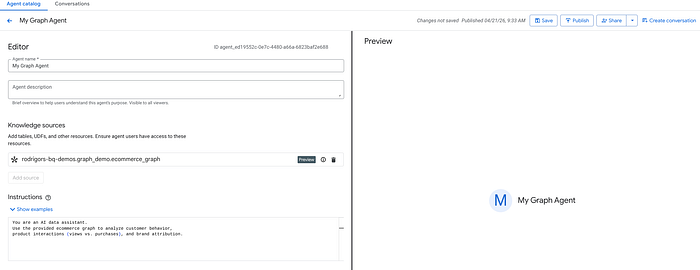
- Open the Agents pane in BigQuery Studio.
- Click Create New Agent and add a name to it.
- Click Add Source.
- Click on Graphs and select the
ecommerce_graphobject (notice that, as for now, you can only select one graph per agent). - (Best Practice) Supply base instructions: "You are an AI data assistant. Use the provided ecommerce graph to analyze customer behavior, product interactions (views vs. purchases), and brand attribution."
- Save and Publish the agent.
Step 4: Testing Multi-Hop Context Awareness
If we only provided flat tables to the agent, asking it to untangle views vs. purchases across different brands would require the LLM to generate the SQL query with (possible) multiple self-joins and subqueries , which has a higher chance of hallucinations.
Because we grounded the agent in ecommerce_graph, the model intrinsically understands the paths. Let's look at a few prompts.
Prompt 1: Intersecting Edge Types
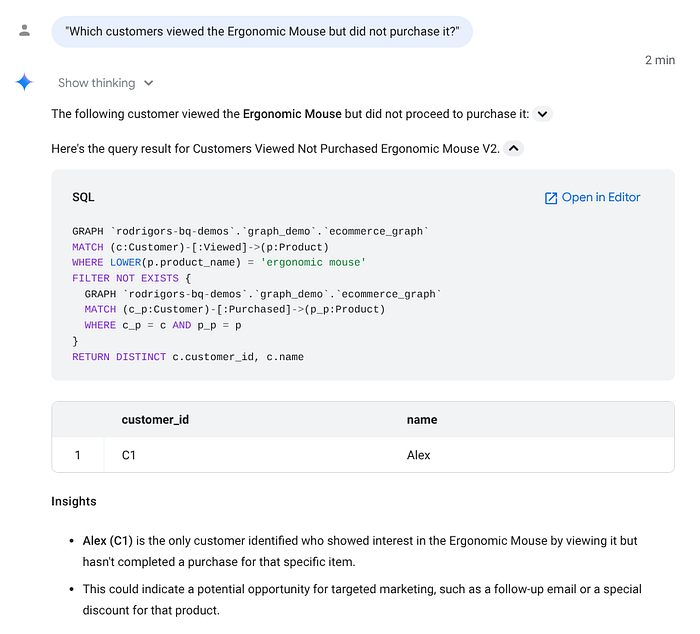
"Which customers viewed the Ergonomic Mouse but did not purchase it?"Agent Translation Logic: The agent recognizes it needs to find nodes of type Customer connected to the Product ('Ergonomic Mouse') via a Viewed edge, but explicitly filtering out those connected via a Purchased edge.
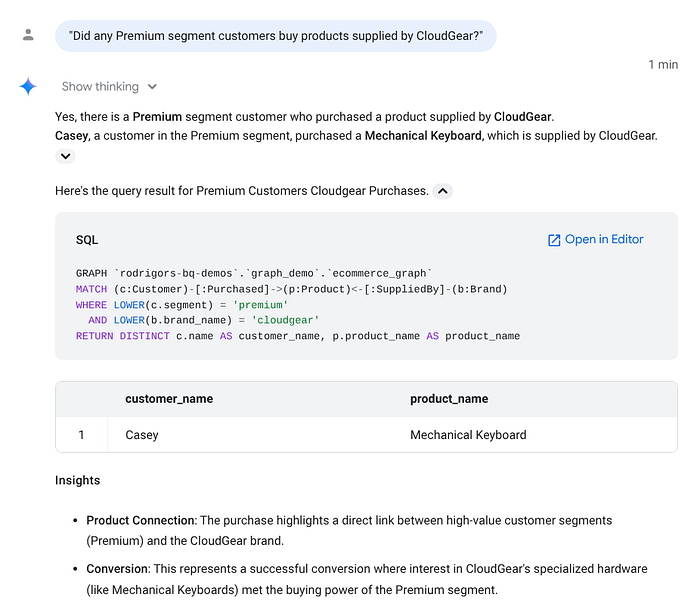
Prompt 2: Deep Context (Multi-Hop Traversal)
"Did any Premium segment customers buy products supplied by CloudGear?"Agent Translation Logic:
This requires a deep traversal: Customer (Filter: Segment='Premium') -> Purchased (Edge) -> Product <- SuppliedBy (Edge) <- Brand (Filter: Name='CloudGear').
The Verdict: Graphs are the Missing Link for Data Agents
Integrating BigQuery Graph with Data Agents fundamentally changes how we approach Conversational Analytics.
- Deterministic Business Logic: Instead of hoping an LLM infers that a "View" is different from a "Purchase," the graph's
EDGE TABLESdefine those physics explicitly. - Mitigating Hallucinations: By restricting the AI's contextual universe to a pre-defined topological map, the rate of invalid schema joins drops to near zero.
- Advanced Analytics at Scale: Startups and enterprises alike can bypass weeks of complex view engineering. The
CREATE PROPERTY GRAPHstatement serves as a universal semantic layer.
If you are deploying BigQuery Data Agents, do not leave your data flat. Define the relationships, build the graph, and let the AI leverage the full context of your architecture.