You can read it for free from here!
Most Claude Code users know the .claude/ folder exists, but far fewer think carefully about how it should be organized.
At first, that usually does not seem like a problem. A small project can get by with a basic CLAUDE.md, a few settings, and maybe one or two extra files. But as the project grows, that casual setup starts to show its limits. Instructions become harder to maintain, workflows get scattered across the wrong places, and the folder slowly turns into a mix of useful configuration and hard-to-explain clutter.
That is why structure matters.
A well-organized .claude/ folder makes Claude easier to guide, easier to trust, and easier to scale across a real project. It helps separate broad instructions from detailed rules, reusable workflows from automated actions, and team-wide standards from personal preferences. Instead of treating .claude/ like a dumping ground for random config, you start treating it like part of the project's operating layer.
In this guide, we will look at how to structure the .claude/ folder for maximum efficiency, what each part should contain, and how to keep the setup clean as your workflows become more advanced.
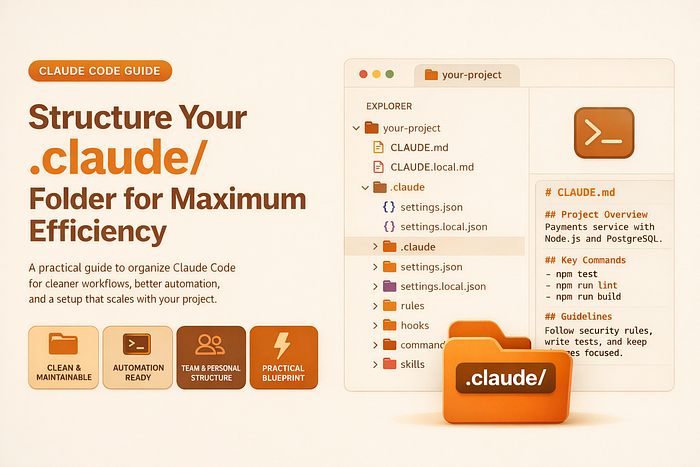
Table of Contents:
- Why the structure of .claude/ matters?
- Start with the core: what should live at the top level
- Keep instructions lean: CLAUDE.md vs rules/
- Organize for action: hooks/, commands/, and reusable workflows
- Structure specialized capabilities: skills/ and agents/
- Separate team structure from personal structure
- A practical blueprint for an efficient .claude/ folder
- Common structure mistakes to avoid
Before we dive in, if you're working with Claude Code and want to go beyond basic prompting, I'm hosting a hands-on workshop that might be useful.
Building Agent Skills for Claude Code is a practical session where we focus on creating reusable Skills that help you build more consistent and repeatable workflows.

1. Why the structure of .claude/ matters?
Most people discover the .claude/ folder by accident!
They see it appear in the project, recognize that it is related to Claude Code, and leave it alone unless they need to change one specific setting. Over time, that folder becomes a mix of instructions, scripts, rules, and experiments with no clear structure behind it.
That usually works at the beginning. It stops working once the project grows.
A poorly organized .claude/ folder creates the same kind of friction as a poorly organized codebase. Instructions become harder to maintain. Important rules get buried. Automation scripts pile up without naming conventions. Team members are no longer sure where to add new guidance or which files are still active. Instead of making Claude easier to work with, the folder starts adding noise.
A well-structured .claude/ folder does the opposite. It gives every part of your Claude Code setup a clear place. Your main instructions are easy to find. Reusable rules are separated from one-off preferences. Hooks and workflow files live in predictable locations. Skills and agents, when you actually need them, are organized as deliberate tools rather than scattered experiments.
That structure matters because Claude Code works best when your setup is easy to understand, not only for Claude, but also for you and your team. If the folder is clean, you can update it with confidence. If it is messy, even small improvements start to feel risky.
The goal is not to create the biggest possible .claude/ folder. The goal is to create one that is easy to navigate, easy to maintain, and easy to scale as your workflow becomes more sophisticated. In practice, maximum efficiency comes from clarity: every file should have a purpose, every folder should solve a specific problem, and the overall structure should make sense at a glance.
That is the real value of organizing .claude/ properly. You are not just storing configuration files. You are building the operating layer that shapes how Claude works inside your project.
Before diving into each component, it helps to look at the overall structure of an efficient .claude/ folder. Think of this as the target layout we want to build toward as the project becomes more sophisticated.
your-project/
├── CLAUDE.md                  # Main project instructions
├── CLAUDE.local.md            # Personal overrides (not committed)
└── .claude/
    ├── settings.json          # Control layer
    ├── rules/                 # Modular instructions
    ├── hooks/                 # Automation scripts
    ├── commands/              # Reusable prompt workflows
    ├── skills/                # Packaged capabilities
    └── agents/                # Specialized subagents
2. Start with the core: what should live at the top level
Once you look past the subfolders, the most important part of the setup is still the top level. This is where Claude should find the files that define the project at the highest level, without digging through nested directories.
In most cases, that means two things matter first: your main instruction file and your main configuration file.
At the project root, CLAUDE.md should act as the entry point for how Claude understands the codebase. This is where you place the essential context Claude needs in nearly every session: the stack, the main architecture decisions, important conventions, and the commands that define the normal development workflow. If someone on your team wants to understand how Claude is supposed to behave in this repository, this should be the first file they check.
Inside .claude/ folder, the settings.json file should sit at the top level for the same reason. It is not just another support file. It controls the operational side of Claude Code: permissions, hooks, and project-level behavior that needs to be easy to find and update. Burying it deeper in the folder structure makes routine maintenance harder for no real benefit.
That top level should stay intentionally light. The mistake many people make is treating the root of .claude/ like a storage area for every script, workflow, and experimental note they create. That usually leads to clutter fast. Instead, the top level should contain only the files that define the project globally. Anything more specific should move into a dedicated folder.
A simple way to think about it is this:
- CLAUDE.md: explains how the project works
- settings.json: controls how Claude operates in the project
- The subfolders exist to keep everything else organized
That separation is useful because these files serve different purposes. CLAUDE.md is about guidance. settings.json is about control. One tells Claude what matters in the codebase. The other shapes what Claude is allowed to do and what automatic behaviors should happen around its work.
For example, in a FastAPI project, CLAUDE.md might explain that all API schemas live in schemas/, all service logic lives in services/, and every endpoint should validate inputs with Pydantic models.
Meanwhile, .claude/settings.json might allow Claude to run test commands, deny access to .env files, and trigger a formatting hook after file edits. Those two files work together, but they should not be mixed together.
The top level should also make a clear distinction between shared files and personal overrides. A shared CLAUDE.md belongs in the root because the whole team benefits from it.
A personal override, such as CLAUDE.local.md, is different. It exists for local preferences and should stay out of the team's shared structure. The same logic applies to settings.local.json inside .claude/.
In other words, the top level should answer the biggest questions first. What does Claude need to know about this project? What is Claude allowed to do here? Everything else can be organized underneath that foundation.
That is what makes the structure efficient. The most important files stay obvious, while the more specialized pieces are pushed into folders where they are easier to manage without crowding the core setup.
3. Keep instructions lean: CLAUDE.md vs rules/
One of the easiest ways to make .claude/ folder inefficient is to put too much into CLAUDE.md.
At the beginning, that file usually works well because the project is still small. You add a few commands, some coding conventions, and maybe a short note about architecture. But once the codebase grows, CLAUDE.md often turns into a catch-all document for everything the team wants Claude to remember. That is when it starts losing clarity.
A better structure is to treat CLAUDE.md as the project's operating guide, not its entire knowledge base.
CLAUDE.md should hold the instructions Claude needs across most sessions:
- What the project is
- How it is organized
- Which commands matter most
- What conventions apply broadly
- What constraints should Claude not miss
The rules/ folder is where more specific guidance belongs. That includes instructions tied to a certain part of the codebase, a certain workflow, or a certain engineering concern like testing or security.
A simple way to think about it is this:
- CLAUDE.md holds global guidance
- rules/ holds specialized guidance
That split makes the structure easier to maintain and easier to scale.
A practical example
Imagine you are working on a product with three main areas:
- a Next.js frontend
- a FastAPI backend
- a data pipeline for reporting jobs
If you try to describe everything in CLAUDE.md, the file becomes noisy very quickly. Frontend conventions sit next to backend validation rules and data pipeline notes. Claude gets more context, but not always better context.
A cleaner setup would look like this:
your-project/
├── CLAUDE.md
└── .claude/
    └── rules/
        ├── frontend.md
        ├── backend-api.md
        ├── testing.md
        └── data-pipelines.md
In this setup:
- CLAUDE.md: explains the product at a high-level
- frontend.md: focuses on UI conventions
- backend-api.md: focuses on API behavior and validation rules
- testing.md: explains how tests should be written and run
- data-pipelines.md: captures conventions for batch jobs and scheduled tasks
That is much easier to maintain than one large instruction file.
What should stay in CLAUDE.md?
A good CLAUDE.md usually includes:
- The main stack
- The high-level architecture
- The most important development commands
- Broad code conventions
- Important project-wide warnings or constraints
Here is a short example for a FastAPI project:
# Project: Customer Insights AP

## Stack
- FastAPI
- PostgreSQL
- SQLAlchemy
- Pytest

## Structure
- `app/api/` contains route definitions
- `app/services/` contains business logic
- `app/models/` contains ORM models
- `app/schemas/` contains request and response schemas

## Commands
- `pytest` runs the test suite
- `alembic upgrade head` applies migrations
- `ruff check .` runs linting
- `ruff format .` formats the code

## Conventions
- Validate all request bodies with Pydantic schemas
- Keep route handlers thin; business logic belongs in services
- Do not expose internal exception details in API responses
This is useful because it gives Claude a reliable starting point without drowning it in detail.
What should move into rules/?
Once instructions become narrow or area-specific, move them out of CLAUDE.md.
For example, backend-api.md might contain rules like these:
# Backend API Rules

- Every new endpoint must include request and response schemas
- Use dependency injection for database sessions
- Return paginated results for collection endpoints
- Log external API failures with the shared logger
- Prefer service-layer functions over logic inside route files
And frontend.md might say:
# Frontend Rules

- Prefer server components unless client interactivity is required
- Keep UI state local unless it is shared across pages
- Reuse design system components before creating new ones
- Put page-specific components beside their route when possible
Now each file has a clear purpose.
When rules/ becomes the better choice
You should usually split into rules/ when:
- CLAUDE.md starts feeling crowded
- Different parts of the repo need different guidance
- Different people have different standards
- The team updates conventions often
- You want to scope instructions to specific paths or concerns
This is where modularity starts paying off. Instead of editing one big document every time, you update only the file that matches the problem.
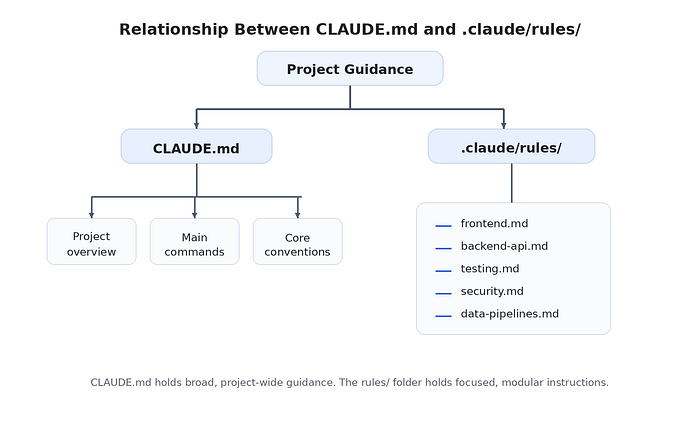
This diagram helps the reader see that CLAUDE.md is the central layer, while rules/ breaks out detailed guidance into smaller units.
A stronger structure with path-based rules
As the repo grows, it can be useful to make some rules apply only to certain files. For example:
.claude/
└── rules/
    ├── frontend.md
    ├── backend-api.md
    ├── tests.md
    └── migrations.m
That way, backend-specific instructions do not crowd frontend work, and migration guidance appears only when Claude is operating around database changes.
Even without going deep into syntax, the important organizational idea is simple: keep your global instructions broad, and move targeted guidance into modular files.
Why is this structure more efficient?
This separation improves efficiency in three ways.
- First, it keeps CLAUDE.md readable. That makes it easier for both humans and Claude to extract the main project context quickly.
- Second, it reduces maintenance overhead. You do not have to keep reopening one oversized file whenever a single convention changes.
- Third, it creates a cleaner path for team ownership. The people responsible for testing, frontend work, or API design can update their own rule files without turning the main instruction file into shared clutter.
In practice, the best setup is not the one with the most instructions. It is the one where instructions are placed at the right level.
4. Organize for action: hooks/, commands/, and reusable workflows
Once your .claude/ folder has a clean instruction layer, the next step is organizing the files that turn guidance into action.
This is where many setups start to get messy. Teams add a shell script for formatting, a prompt file for pull request review, maybe another script for checking tests, and before long, those files are scattered across the root of .claude/ with names that only make sense to the person who created them.
A better approach is to separate instruction files from action files.
Instruction files explain how Claude should behave. Action files support what Claude actually does repeatedly. That is why folders like hooks/ and commands/ deserve their own place in the structure.
The role of hooks/
The hooks/ folder is where you place scripts that run automatically at specific points in Claude's workflow.
These files are not general documentation. They are operational scripts. Their job is usually one of three things:
- Prevent risky actions
- Clean up or validate Claude's output
- Enforce a workflow requirement
A clean structure might look like this:
.claude/
├── settings.json
├── hooks/
│   ├── block-dangerous-commands.sh
│   ├── format-edits.sh
│   └── run-tests-before-stop.sh
└── commands/
    ├── review-pr.md
    ├── write-tests.md
    └── summarize-changes.md
In this setup:
- block-dangerous-commands.sh is a safety hook
- format-edits.sh keeps file changes clean
- run-tests-before-stop.sh checks quality before Claude finishes
That is much easier to understand than dropping all three scripts into .claude/ without a folder.
A practical hook example
Imagine you are working in a Python service where every Claude edit should be formatted automatically.
Your workflow might use:
- ruff format . for formatting
- ruff check . for linting
A good structure would place the formatting logic in a dedicated script:
#!/usr/bin/env bash
jq -r '.tool_input.file_path' | xargs ruff format
And that script would live here:
.claude/
└── hooks/
    └── format-edits.sh
The important point is structural: even if the hook is small, it should still live in hooks/, because that folder tells your team exactly what kind of file it is.
The role of commands/
The commands/ folder is useful for reusable prompt workflows.
These are not automatic like hooks. Instead, they package tasks you or your team run repeatedly, such as:
- Reviewing a pull request
- Writing missing tests
- Summarizing changes for release notes
- Debugging a reported issue
- Drafting migration steps
The value of commands/ is that it reduces repeated prompting. Instead of rewriting the same instruction every time, you store that workflow once in a clear place.
For example:
.claude/
└── commands/
    ├── review-pr.md
    ├── fix-bug.md
    ├── write-tests.md
    └── prepare-release-notes.md
Each file should have one obvious purpose. That is the key to efficiency.
A practical command example
Suppose your team often asks Claude to review backend changes before merging. Instead of writing a fresh prompt each time, you create:
# review-pr

Review the current changes with a focus on:
- correctness
- missing edge cases
- API contract changes
- test coverage gaps
Summarize:
1. critical issues
2. medium-risk issues
3. suggested improvements
Saved as:
.claude/
└── commands/
    └── review-pr.md
That immediately makes the workflow easier to reuse and easier to improve over time.
Why should these stay separate?
A common mistake is to blur the purpose of these files.
For example:
- Putting reusable review prompts inside CLAUDE.md
- Placing hook scripts directly beside settings files
- Using one large script to handle formatting, testing, notifications, and logging all at once
That usually creates maintenance problems.
A cleaner pattern is:
CLAUDE.mdexplains the projectrules/refines guidancehooks/contains automatic operational scriptscommands/contains reusable prompt workflows
That division makes the folder easier to scan, easier to extend, and easier for teammates to understand.
Folder/code-tree visual
Here is a visual you can place in the article:
.claude/
├── settings.json
├── rules/
│   ├── frontend.md
│   ├── backend-api.md
│   └── testing.md
├── hooks/
│   ├── block-dangerous-commands.sh
│   ├── format-edits.sh
│   └── run-tests-before-stop.sh
└── commands/
    ├── review-pr.md
    ├── write-tests.md
    └── summarize-changes.md
This works well because it shows that hooks/ and commands/ sit beside the instruction layer, not inside it.
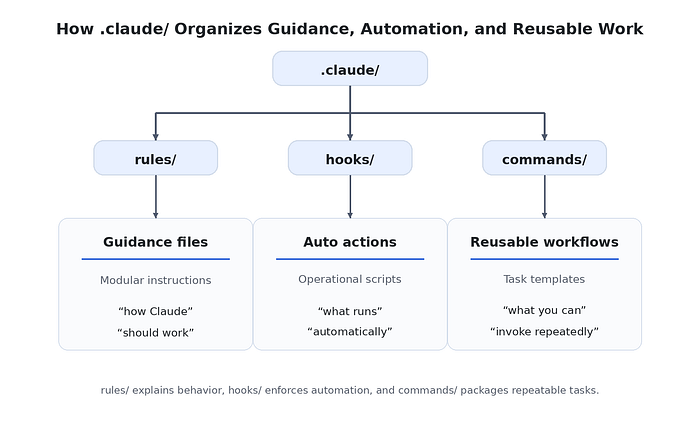
A good naming strategy
This section is also a good place to mention naming, because naming is part of the structure.
Good names make purpose obvious:
- format-edits.sh
- block-dangerous-commands.sh
- review-pr.md
- write-tests.md
Weak names make the folder harder to use:
- script1.sh
- helper.sh
- misc.md
- temp-review.md
If someone opens .claude/hooks/ or .claude/commands/, they should understand each file's purpose immediately.
A realistic example for a web app team
For a SaaS web app, the structure might look like this:
.claude/
├── hooks/
│   ├── lint-edits.sh
│   ├── block-prod-commands.sh
│   └── notify-on-completion.sh
└── commands/
    ├── review-ui-changes.md
    ├── generate-test-cases.md
    ├── investigate-bug-report.md
    └── draft-release-summary.md
This is a strong setup because each file reflects a recurring need:
- Hooks protect and validate
- commands speed up repeated tasks
Why is this structure more efficient?
This structure improves efficiency by keeping operational logic out of instruction files.
Instead of bloating CLAUDE.md with process details or scattering utility files everywhere, you give each kind of artifact its own location. That makes it easier to maintain workflows, easier to onboard teammates, and easier to see where a new file belongs.
In practice, a .claude/ folder becomes much more useful when people no longer have to guess whether something is:
- A project rule
- An automated script
- A reusable task definition
That clarity is what makes the setup scale
5. Structure specialized capabilities: skills/ and agents/
Once the core of your .claude/ folder is organized, the next question is whether you need more specialized capabilities.
This is where skills/ and agents/ come in.
These two folders are useful, but they should not be the starting point for most projects. They make sense when your team has recurring workflows that are complex enough to deserve their own structure. If CLAUDE.md, rules/, hooks/, and commands/ already cover most of your needs, that is a good sign. It means your setup is still simple and efficient.
You add skills/ and agents/ when you want Claude to handle more specialized work in a cleaner, more reusable way.
What belongs in skills/ Folder?
A skill is best thought of as a packaged capability. It is useful when a workflow has:
- A clear purpose
- A repeatable process
- Supporting files or detailed guidance
- Enough complexity that a short command file is no longer enough
That is why skills/ usually work best as a folder of self-contained directories rather than loose files. A clean structure looks like this:
.claude/
└── skills/
    ├── api-review/
    │   ├── SKILL.md
    │   └── checklist.md
    ├── release-prep/
    │   ├── SKILL.md
    │   └── release-template.md
    └── docs-audit/
        ├── SKILL.md
        └── style-guide.md
This is efficient because each skill has its own home. The logic, description, and supporting files stay together.
A practical skill example
Imagine your team regularly prepares releases. That workflow involves:
- Checking recent changes
- Reviewing version notes
- Drafting a release summary
- Confirming whether migrations or breaking changes exist
That is more than a quick reusable prompt. It is a repeatable process with context. So instead of storing everything in commands/, you package it like this:
.claude/
└── skills/
    └── release-prep/
        ├── SKILL.md
        └── release-template.md
The SKILL.md defines what the skill is for, and release-template.md gives Claude a reusable output structure. That is much cleaner than scattering release instructions across multiple command files.
When should a workflow stay a command instead?
This distinction matters for structure. A command is usually enough when the task is:
- Short
- Direct
- Mostly prompt-driven
- Easy to express in one file
A skill makes more sense when the task:
- Has several steps
- Needs companion documents
- Is important enough to standardize more carefully
- Will be reused over time
A simple way to think about it:
- commands/ = lightweight reusable tasks
- skills/ = packaged workflows with more depth
What belongs in agents/ folder?
The agents/ folder is for specialized subagents. These are useful when you want a narrower, role-based persona for a certain kind of work. Instead of using the same general Claude setup for every task, you define focused roles such as:
- Code reviewer
- Security auditor
- Documentation editor
- Migration checker
- Performance reviewer
A clean structure looks like this:
.claude/
└── agents/
    ├── code-reviewer.md
    ├── security-auditor.md
    ├── docs-writer.md
    └── performance-checker.md
This works well because each agent file has a single, clear purpose.
A practical agent example
Suppose your team often asks Claude to review API changes for correctness and edge cases before merging. A general prompt may work, but over time, you may want a dedicated reviewer persona with tighter boundaries.
That is a strong case for an agent like:
.claude/
└── agents/
    └── code-reviewer.md
That agent can be designed to focus on:
- Correctness
- Risky assumptions
- Missing edge cases
- Test coverage gaps
The structural benefit is that your specialized review logic is no longer hidden inside a random prompt or spread across multiple files. It has one dedicated home.
Keep both folders clean and purpose-specific
One of the biggest mistakes with skills/ and agents/ is treating them as experimental storage. That usually leads to folders full of:
- Half-finished skills
- Duplicate agents
- Overlapping reviewer personas
- Vague names like helper.md or analysis.md
That makes the setup harder to use, not more efficient. A better rule is this:
- Each skill should solve one recurring workflow
- Each agent should own one specialized role
- If two files overlap heavily, they probably should be merged or simplified
Folder/code-tree visual
Here is a visual you can place in the article:
.claude/
├── commands/
│   ├── review-pr.md
│   └── write-tests.md
├── skills/
│   ├── release-prep/
│   │   ├── SKILL.md
│   │   └── release-template.md
│   └── docs-audit/
│       ├── SKILL.md
│       └── style-guide.md
└── agents/
    ├── code-reviewer.md
    ├── security-auditor.md
    └── docs-writer.md
This is useful because it shows the progression:
- commands/ for lighter reusable tasks
- skills/ for richer packaged workflows
- agents/ for specialized personas
A realistic example for a product team
For a SaaS team, the structure might look like this:
.claude/
├── skills/
│   ├── release-prep/
│   │   ├── SKILL.md
│   │   └── release-template.md
│   ├── api-audit/
│   │   ├── SKILL.md
│   │   └── api-checklist.md
│   └── onboarding-docs/
│       ├── SKILL.md
│       └── docs-outline.md
└── agents/
    ├── code-reviewer.md
    ├── security-auditor.md
    └── documentation-editor.md
This kind of structure works well when the team has a few recurring workflows that deserve more than a one-line command.
When not to add these folders yet?
This is important for keeping the article practical.
Do not add skills/ and agents/ just because they exist. Add them when there is a clear structural reason.
You probably do not need them yet if:
- Most tasks are still simple
- Your team rarely repeats the same advanced workflow
- Command files already solve the problem
- You are still refining basic instructions and permissions
Efficiency does not come from having more folders. It comes from adding structure only when the workflow justifies it.
Why this structure is more efficient?
skills/ and agents/ improve efficiency when they reduce repetition without adding clutter.
A good skill keeps a complex workflow packaged in one place. A good agent keeps a specialized role narrow and reusable. Both make the .claude/ folder easier to extend when they are used intentionally.
But the key is discipline. These folders should stay small, purposeful, and easy to scan. If they become a dumping ground for experiments, they stop helping.
The best .claude/ structures are not the ones with the most advanced features. They are the ones where advanced features are introduced only when they clearly improve the workflow.
6. Separate team structure from personal structure
A .claude/ folder becomes much easier to manage when you stop thinking of it as one shared space and start treating it as two separate layers: team configuration and personal configuration.
That distinction matters more than most people expect.
In the early stages of a project, it is common for everything to end up in the same place. A developer adds a personal preference to CLAUDE.md. Someone tweaks settings.json for a workflow that only makes sense on their machine. Another person adds a useful agent, but it reflects their own working style rather than the team's needs.
None of this looks serious at first. Over time, though, the shared setup becomes harder to understand because it no longer represents the project clearly. It starts representing a mix of project standards and individual habits.
That is where friction begins.
An efficient setup makes a clean separation between what the project needs and what the individual developer prefers.
The project-level structure should contain the rules, workflows, and safeguards that help the whole team work consistently. These are the files you want everyone to inherit when they clone the repository and start using Claude in that codebase. In contrast, personal preferences should stay local, either in override files inside the project or in the user's global ~/.claude/ directory.
A healthy structure often looks like this:
your-project/
├── CLAUDE.md
├── CLAUDE.local.md
└── .claude/
    ├── settings.json
    ├── settings.local.json
    ├── rules/
    ├── hooks/
    ├── commands/
    ├── skills/
    └── agents/
~/.claude/
├── CLAUDE.md
├── settings.json
├── skills/
├── agents/
└── projects/
This layout works well because the boundary is clear.
At the project level, files define how Claude should behave inside this repository. That includes shared instructions, modular rules, automation hooks, reusable team workflows, and any specialized skills or agents that solve recurring project problems.
At the personal level, files define how one developer prefers to work across repositories. That might include personal writing preferences, private skills, custom agents, or machine-specific states that should never be committed to the team repo.
A good rule is simple: if the configuration helps the whole team work more consistently, it belongs in the project. If it mainly reflects one person's workflow, it belongs in their local or global setup.
For example, imagine a backend team working on a payments service. They all want Claude to follow the same API conventions, avoid sensitive files such as .env, run checks before finishing major changes, and use the same review workflow for pull requests. Those belong in the shared project structure because they improve consistency for everyone.
That setup might look like this:
your-project/
├── CLAUDE.md
└── .claude/
    ├── settings.json
    ├── rules/
    │   ├── api.md
    │   ├── testing.md
    │   └── security.md
    ├── hooks/
    │   ├── block-secrets-access.sh
    │   └── run-tests-before-stop.sh
    └── commands/
        ├── review-pr.md
        └── investigate-bug.md
Everything in that structure has team value. Any developer joining the repository should benefit from it immediately.
Now compare that with a personal setup. One developer may use Claude across multiple projects to draft technical documentation. Another may rely on a private SQL review skill for analytics work. Those can be useful, but they are not necessarily project standards. They should stay personal unless the team explicitly decides to adopt them.
A personal structure could look like this:
~/.claude/
├── CLAUDE.md
├── skills/
│   ├── article-outline/
│   │   ├── SKILL.md
│   │   └── outline-template.md
│   └── sql-review/
│       ├── SKILL.md
│       └── checklist.md
└── agents/
    ├── documentation-editor.md
    └── sql-reviewer.md
This kind of setup improves one person's workflow without adding noise to the shared repository.
There is also a useful middle layer: local override files inside the project. Files like CLAUDE.local.md and .claude/settings.local.json are helpful when someone wants to adjust behavior in a specific repository without changing the version-controlled team setup. That gives people room to experiment or personalize their workflow without turning every local preference into a team decision.
For instance, one developer might want slightly different local permissions while testing a hook. Another might want Claude to generate shorter summaries for their own review process. Those are good uses of local override files. They stay close to the project, but they do not become part of the shared contract for everyone else.
The structural reason this matters is that a .claude/ setup should not only be organized by file type. It should also be organized by ownership.
That ownership split is what keeps the configuration maintainable as the team grows. Shared files remain trustworthy because everyone knows they represent actual project standards. Personal files remain flexible because individuals can adapt Claude to their own working style without creating confusion in the repository.
A simple way to visualize the idea is this:
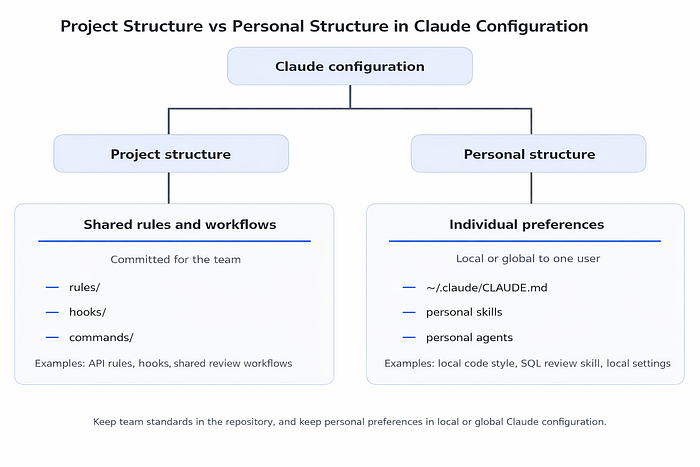
This is the real takeaway: project structure is about consistency, while personal structure is about individual efficiency.
When those two are mixed, the .claude/ folder becomes harder to trust and harder to maintain. When they are kept separate, the setup becomes cleaner, easier to scale, and much easier for a team to work with over time.
7. A practical blueprint for an efficient .claude/ folder
Once the main pieces are clear, the next step is to put them together into a structure that is easy to maintain in real projects.
This is where many teams overcomplicate things. They understand what CLAUDE.md does, they experiment with rules and hooks, and then they start adding folders faster than they can manage them. The result is a .claude/ setup that looks advanced but feels harder to use than the default.
A better approach is to think in terms of a practical blueprint: a structure that is organized enough to scale yet simple enough that anyone on the team can understand it quickly.
A strong baseline looks like this:
your-project/
├── CLAUDE.md
├── CLAUDE.local.md
└── .claude/
    ├── settings.json
    ├── settings.local.json
    ├── rules/
    │   ├── backend.md
    │   ├── frontend.md
    │   ├── testing.md
    │   └── security.md
    ├── hooks/
    │   ├── block-dangerous-commands.sh
    │   ├── format-edits.sh
    │   └── run-checks-before-stop.sh
    ├── commands/
    │   ├── review-pr.md
    │   ├── write-tests.md
    │   └── summarize-changes.md
    ├── skills/
    │   └── release-prep/
    │       ├── SKILL.md
    │       └── release-template.md
    └── agents/
        ├── code-reviewer.md
        └── security-auditor.md
This structure works because each layer has a clear role.
CLAUDE.md gives Claude the broad context it needs in almost every session. It explains the project, the main commands, the high-level architecture, and the conventions that apply across the repository.
The settings.json controls the operational side. It is where permissions, hooks, and project-wide behavior belong. It should stay easy to locate because it defines how Claude is allowed to work inside the codebase.
The rules/ folder holds modular guidance. Instead of putting every standard into CLAUDE.md, the project splits more focused instructions into separate files, such as backend.md, frontend.md, testing.md, and security.md. That makes updates easier and prevents the main instruction file from becoming bloated.
The hooks/ folder keeps automation scripts in one predictable place. These are the files that run automatically to enforce safety or consistency, such as blocking risky commands, formatting edited files, or running checks before Claude stops.
The commands/ folder stores lightweight reusable workflows. These are best for tasks that are repeated often but still fit neatly into a single prompt file, such as pull request review, writing tests, or summarizing recent changes.
The skills/ folder is where more involved workflows begin to justify extra structure. In this example, release-prep/ is packaged as its own folder because it likely includes more than a simple instruction. It may need a checklist, a template, and a clear workflow description in SKILL.md.
The agents/ folder holds specialized roles. In a mature setup, these should stay narrow and purposeful. A code-reviewer.md agent makes sense if the team regularly asks Claude to review correctness and edge cases. A security-auditor.md agent makes sense if security review is a recurring workflow with its own lens.
What makes this blueprint efficient is not that it includes every possible folder. It is that every folder has a reason to exist.
That distinction matters. A small project may not need skills/ or agents/ yet. A very simple repository might only need this:
your-project/
├── CLAUDE.md
└── .claude/
    ├── settings.json
    ├── rules/
    │   ├── testing.md
    │   └── security.md
    └── hooks/
        └── format-edits.sh
That is still a strong structure. In fact, it is often the better one early on. Efficiency does not come from filling out every folder in advance. It comes from adding structure only when the workflow actually needs it.
A useful way to think about the blueprint is as a progression:
- Start with CLAUDE.md and settings.json
- Add rules/ when one instruction file stops scaling
- Add hooks/ when you need automation or enforcement
- Add commands/ when prompts become repetitive
- Add skills/ when workflows become deeper
- Add agents/ when specialization clearly improves results
That progression keeps the folder from growing randomly.
Here is another example for a product team with a frontend app and backend API:
.claude/
├── settings.json
├── rules/
│   ├── ui-components.md
│   ├── api-contracts.md
│   └── testing.md
├── hooks/
│   ├── lint-edits.sh
│   └── block-prod-commands.sh
├── commands/
│   ├── review-ui-changes.md
│   └── investigate-bug.md
└── agents/
    ├── ui-reviewer.md
    └── api-reviewer.md
This version is narrower, but it follows the same structural logic. That is the main point of the blueprint: the exact files will change from one project to another, but the organizational principles stay stable.
A good .claude/ structure should answer these questions immediately:
- Where do project-wide instructions live?
- Where do modular rules go?
- Where do automation scripts belong?
- Where do reusable workflows go?
- Which files are shared, and which are personal?
- Which parts are active, and which are just experiments?
If the folder answers those questions clearly, it is already doing its job.
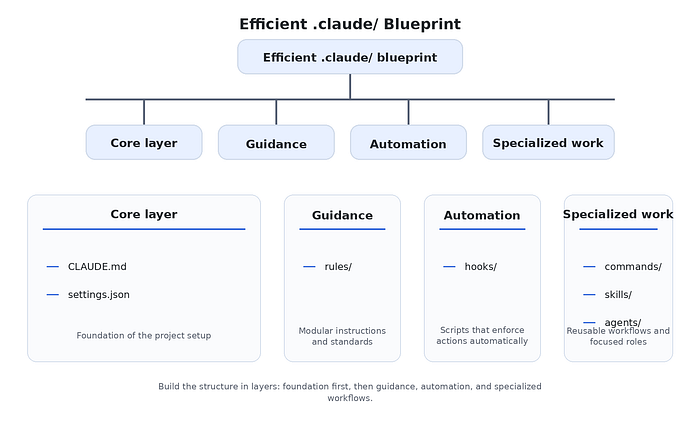
The main takeaway from this section is simple: the best .claude/ folder is not the most feature-rich one. It is the one where the structure grows in step with the project, and where every addition makes the setup easier to understand rather than harder.
8. Common structure mistakes to avoid
A .claude/ folder does not become inefficient because it is too simple. It becomes inefficient when files lose their purpose.
That usually happens gradually. A team starts with a clear setup, then adds a few quick fixes, a couple of experimental files, some personal preferences, and a handful of workflows that never get cleaned up. Nothing looks seriously broken, but the structure becomes harder to trust. People stop knowing where to put new files, which rules are still active, or whether a script reflects a real team standard or just someone's temporary workaround.
That is why the biggest .claude/ problems are usually structural, not technical.
The first mistake is putting too much into CLAUDE.md. This is one of the most common issues because CLAUDE.md is the easiest place to add new instructions. Over time, it turns into a long document that mixes project overview, coding rules, review checklists, testing notes, exceptions, and one-off reminders. At that point, it stops working as a high-level guide and starts behaving like a cluttered storage file. A better approach is to keep CLAUDE.md focused on the broad project context and moved specialized guidance into rules/.
The second mistake is adding folders before they are needed. Some teams create skills/, agents/, and large command collections early because the structure looks powerful. But empty or barely used folders do not make the setup more mature. They often make it more confusing. If a workflow is still simple, keep it simple. A command file is often enough. If a project does not yet need specialized agents, do not create them just to fill out the structure.
Another common problem is mixing team standards with personal preferences. This usually happens when local working habits start leaking into committed files. A developer adds their own preferred phrasing to shared instructions, commits a workflow that only makes sense for their machine, or turns a personal agent into a team file without a clear reason. Once that happens, the repository stops reflecting the team's shared workflow and starts reflecting individual style. That is why project structure and personal structure need to stay separate.
Naming is another place where structure often breaks down. A folder full of files like misc.md, helper.sh, test2.md, or temp-review.md becomes hard to navigate very quickly. Names should make the purpose obvious. A file called review-pr.md is clear. A script called block-dangerous-commands.sh is clear. Good naming reduces friction because the structure explains itself.
There is also the problem of stale files. This is especially common in commands/, skills/, and agents/. A team experiments with a workflow, stops using it, but leaves the file in place. A rule file gets replaced by a newer one, but the old one is never removed. A hook is disabled in practice, yet the script still lives in the folder. Over time, the .claude/ directory starts accumulating dead weight. That makes it harder to tell which parts of the setup are real and which parts are leftovers. An efficient .claude/ folder needs occasional cleanup, just like the codebase itself.
Another mistake is treating all instructions as equal. They are not. Some belong in CLAUDE.md, some belong in rules/, some belong in commands/, and some should not live in .claude/ at all. For example, if something is really a formatter rule, linter rule, or build rule, it probably belongs in the actual tool configuration rather than being repeated as a Claude instruction. A good .claude/ structure works best when it complements the rest of the repository instead of trying to replace it.
A useful checklist is to ask these questions whenever the folder starts feeling crowded:
- Does this file have one clear purpose?
- Does it belong in the shared project structure or in personal configuration?
- Is this a broad instruction, a modular rule, an automation script, or a reusable workflow?
- Is the current name specific enough?
- Is this file still actively useful?
If the answer to those questions is unclear, the structure probably needs to be simplified.
A quick visual summary of the mistakes looks like this:
Common .claude/ mistakes
│
├── Overloaded CLAUDE.md
├── Too many folders too early
├── Shared files mixed with personal preferences
├── Weak or vague filenames
├── Old workflows left behind
└── Instructions stored in the wrong place
The goal is not to build the most elaborate .claude/ folder possible. The goal is to build one where every file earns its place.
That is really the main takeaway from this article. A good .claude/ structure is not about complexity. It is about clarity. When the folder is organized well, Claude becomes easier to guide, easier to trust, and easier to use across a growing project. When the structure is messy, even good instructions lose value because the system around them becomes harder to maintain.
The best setups usually start small, stay intentional, and grow only when the workflow clearly demands it.
The best .claude/ folder is not the one with the most files, the most folders, or the most advanced setup. It is the one where every part has a clear purpose.
That usually means keeping the core simple, splitting instructions only when they need to scale, organizing automation separately from guidance, and making a clear distinction between team configuration and personal preferences. It also means resisting the urge to add extra structure before the workflow actually needs it.
When .claude/ is organized well, Claude becomes much easier to work with. The setup feels predictable, maintainable, and easier for a team to share. And as the project grows, the folder can grow with it without becoming messy.
In the end, maximum efficiency comes from clarity. The cleaner the structure, the easier it is for both you and Claude to use it well.
If you found this helpful and want to go deeper, I'm running a live workshop:
Building Agent Skills for Claude Code
This is a 1.5-hour hands-on session where we'll go beyond theory and actually build Skills together — from idea → design → implementation → testing.